 ™
Sketches and versions
Every revision is a new version and the old ones are kept. The approved sketch becomes the style.
Design studio
Sketches with versions, a tech pack that puts itself together, technical drawings and artwork, colourways and photo editing. Once the sketch is approved the style is created, with everything sales and production need.
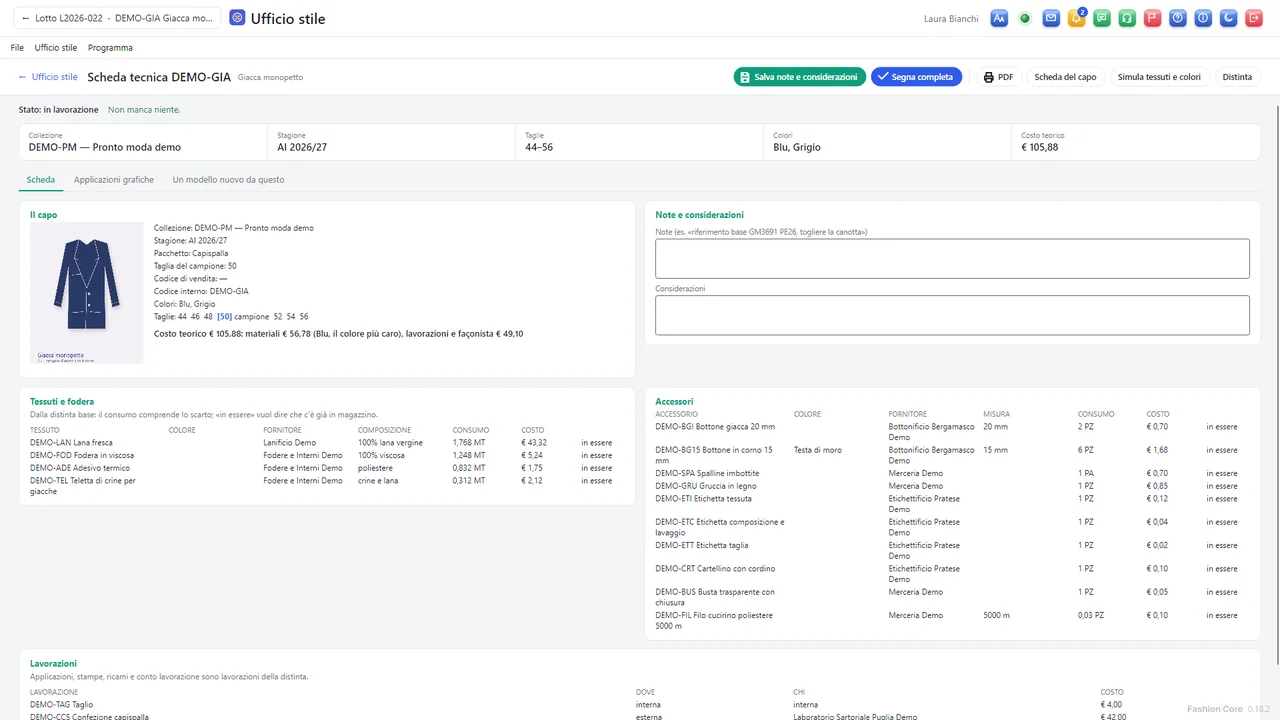
Collection, season, collection group, sample size, codes, photos, colours and sizes, fabrics and lining with the supplier, trims, consumption including waste, operations and estimated cost: the program takes them from the records and tells you what is missing. Then you print it to PDF.
Every revision is a new version and the old ones are kept. The approved sketch becomes the style.
Colours, variants, bill of materials, operations and CAD pieces are copied into the new style; the original stays as it is.
Patches, prints and embroideries are positioned on the image of the garment; their line in the bill of materials is created and updated with them.
On the photo of the garment, apply a colour or the texture of a fabric from stock, keeping light and shadow. You mark the area with clicks, or the AI assistant outlines it.
Pen with curves, shapes, text and dimensions; symmetry to draw half a garment, stitching parallel to the edge, pleats, gathers and ribbing.
Buttons, buttonholes, rivets, zips, pockets, collars and cuffs at their real size, plus the company's own library of details.
Once the style is chosen, the areas take on the colour of each variant; the PDF has one page per colour.
Real size, number of colours and the thread for each colour; colour separation to PDF for screen printing, with registration marks.
Opens SVG files from the most popular graphics programs and exports to SVG, PDF at real size and PNG.
Crop, rotate, brightness and colours, brush, clone stamp and “Remove background” for garment photos; the original is always kept.